
What's New or Changed for 1.11
The Haivision Hub 360 1.11 release adds the following new features:
Full Support for SIM Card Mapping from Transmitter to Hub 360.
TEAL eSIMs installed in your connected transmitters are now fully supported when viewing the SIM Card Management page. See Supported Appliances and Versions for transmitter requirements. You can also search by SIM ID (ICCID, EID or IMSI) in the Appliances screen. |
Transmitter Temperature Display
In the Appliances screen, the temperature of your connected transmitters is now shown. Also, when the temperature reaches the warning or critical level, an icon also appears in the source tile for the appliance on the Master Control Screen. Note See Supported Appliances and Versions for transmitter firmware requirements for this feature. |

Added Option to Not Automatically Allocate StreamHub Inputs
In addition to the current Full Use and Split Load options for a group’s StreamHubs priority settings, added the option to not automatically allocate StreamHub inputs. In this mode, Hub 360 will not automatically search for available an StreamHub input. Manual connection between the source and receiver is required within Master Control. If no connection is made and a live transmission starts, a “No StreamHub available” error occurs on the source appliance. |
Operator Account Renamed
Due to the view-only nature of the account, the operator account is now named observer. Note In previous versions, the operator account could edit Makito templates. This access has been removed, and the observer account it now view-only. |
Hostname clickable in Makito Appliance Details
A |

Increased Number of Visible Tiles on the Master Control Screen
On the Master Control screen, the number of visible tiles has been increased from 50 to 150. |
|
Receivers Dropdown Sorted Alphabetically
On the Master Control screen, the Receivers dropdown now lists your receivers alphabetically. |
|
Increased Transmitters Name Length
Increased maximum name length of transmitters to 23 characters. Note Air, Pro 3, and Rack 300 version 6.3+, Pro 4 and Rack 400 version 4.3+, Falkon version 2.0+, MoJoPro iOS version 6.4+, and MoJoPro Android version 4.2+ are required for this feature. |
|
Support for a Second Custom Streaming Address on StreamHubs
You can now define up to 2 different streaming addresses for a StreamHub. This corresponds to the addresses used by the transmitters or MoJoPro devices to connect to this StreamHub. |
Route Name and StreamHub Information Displayed on Transmitters
Transmitter → StreamHub routes created through Hub 360 now send the name of the route and the StreamHub name and input number to the connected transmitters or MoJoPro devices. Note Air, Pro 3, and Rack 300 version 6.3+, Pro 4 and Rack 400 version 4.3+, Falkon version 2.0+, MoJoPro iOS version 6.4+, and MoJoPro Android version 4.2+ are required for this feature. |
|
Transmitter Serial Numbers Displayed & Searchable
If your transmitter has a serial number defined, it now appears in the Hub 360 appliance details. Transmitter serial numbers are also searchable in the Appliances and Master Control screens. Note Air, Pro 3, and Rack 300 version 6.0+, Pro 4 and Rack 400 version 4.0+, and Falkon version 1.0+ are required for this feature. |
Dynamic Search on Appliances and Master Control
On the Appliances and in Master Control screen, as you type in the searchbox the dropdown list shows matching appliance/source/receiver and label names. |
Streamlined Process for Updating the Firmware of Multiple Transmitters
Hub 360 now allows you to update the firmware of multiple, similar transmitter models simultaneously. For instance, you can upgrade Pro4 and Rack400 series devices in a single operation. |
Backend Statistics Reporting
On the Master Control screen, statistics reporting is now a backend process. You no longer need to keep the screen open to populate the graphs. 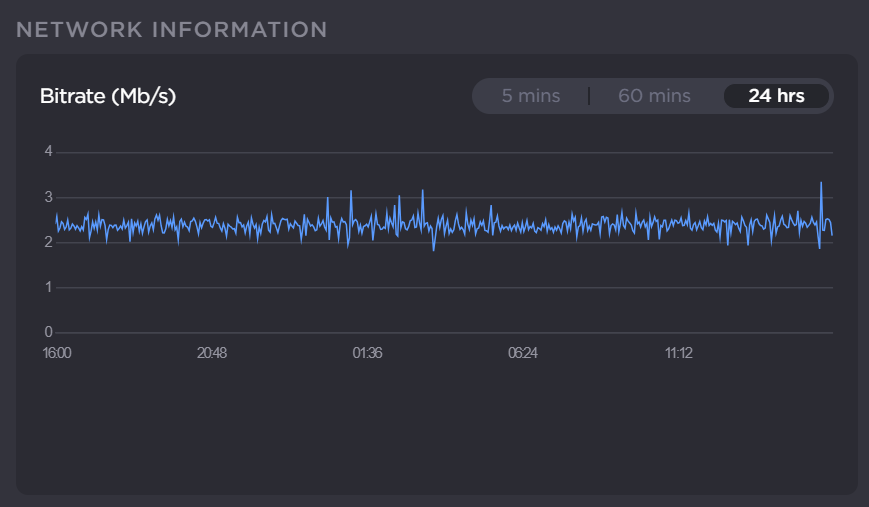 Bitrate 24 Hours Note This new feature must be enabled for your subscription. Please reach out to your Haivision representative for more details. |
|
Makito Latency and Capped Bitrate Values
On the Master Control screen, for Makito Series devices in the expanded and detailed views, the capped bitrate value may now be changed when device is offline. When online and a connection to a destination exists, both values can be changed. Values also persist after changing the destination connection. |