
Set Up Streaming
From the Streams page, you can set up streaming.
Click Streaming on the sidebar and select the Streams tab.
Click the Add Stream button to create the first stream.
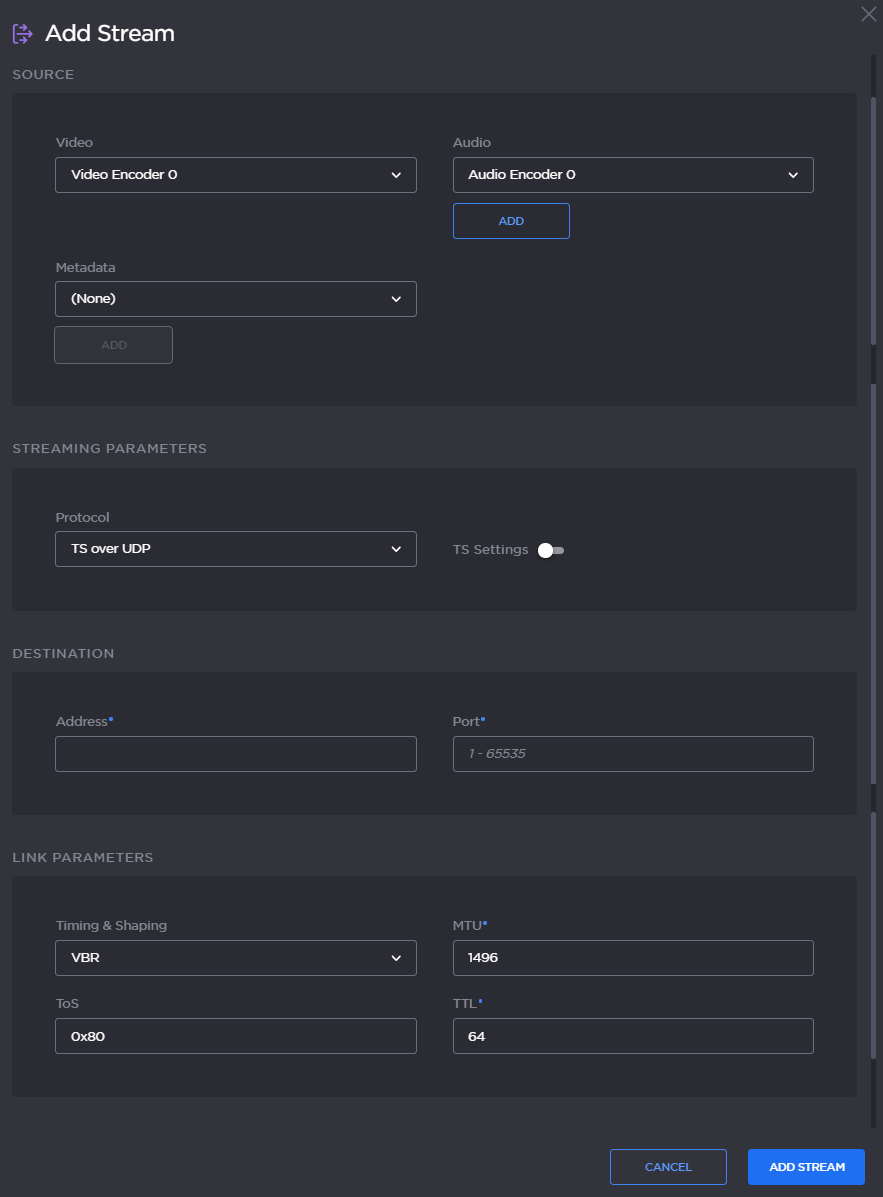
On the New Stream panel, fill in the following fields to choose the Content:
Type a name for the stream in the Name field.
For the Source, (as an example) use Video Encoder 0 and Audio Encoder 0 with no Metadata.

Note
By default, the SDI inputs are assigned to video encoders as follows:
Input 1 (SDI 1) | Video Encoders 0 and 4 |
Input 2 (SDI 2) | Video Encoders 1 and 5 |
Input 3 (SDI 3) | Video Encoders 2 and 6 |
Input 4 (SDI 4) | Video Encoders 3 and 7 |
x
To enable ad insertion, select the appropriate SDI input from the SCTE 35 drop-down menu (under Source).
For more information, see Configuring Ad Insertion Sources (in the User's Guide).
For a basic MPEG-2 transport stream setup, under Streaming Parameters, select TS over UDP as the Protocol (keeping the default TS settings).
Under Destination, type in the IP Address and Port number, for example, multicast address
225.6.7.8and port2000.Leave the default values for the remaining Streaming parameters.
See Stream Settings (in the User's Guide).
Click Add Stream (for a new stream) or Apply (if modifying an existing stream).
Related Topics