
audenc
The audenc command is used to manage encoder audio acquisition settings. The audenc start and audenc stop commands can be used to start and stop encoding of the audio input.
ID is either the encoder ID or all. You can specify a range or a comma-separated list of IDs for the operation, as shown in the examples that follow.
The Makito X1 supports up to 4 audio encoders, the encoder ID numbers are 0-3.
Synopsis
|
Actions
Action | Description |
|---|---|
start | Activates encoding of the audio input. |
stop | Stops encoding of the audio input. |
mute | Mutes encoding of the audio input (i.e., causes the encoder to encode silence instead of the selected audio input.) Tip This may be used when you do not wish to encode the audio but the decoder being used does not support decoding of video-only streams. |
unmute | Resumes encoding of the audio input (when muted) |
set | Configures encoder audio parameters. A series of one or more |
get | Displays encoder audio status information. You can specify configuration, statistics, or all audio information. Tip To display a summary of all the encoders in a table format, you can use |
clear | Clears the encoder’s statistics. |
help | Displays usage information for the audenc command |

Parameters
Parameter | Default | Description/Values |
|---|---|---|
name | Audio Encoder 0, 1, 2... | A unique descriptive name of up to 63 characters. Using 'none' will revert the audio encoder's name to the default. |
| SDI1CH1+2 | The Audio Input for the encoder. Options are:
|
language | n/a | The language used for input. Enter a 3-character long ISO639-2 code or none. If you don't know the code for a language, you can directly enter one of the languages below in full or abbreviated form:
|
level | 6 | (Analog Input only) Adjusts the maximum analog Audio Input signal level (0 dBfs). Level range: -6dBu to 0dBu |
mode | stereo | The number and type of audio channels to encode.
Note 7ch mode is available only when the algorithm is set to 16BitPassThrough.
|
algorithm | [mpeg2]adts | The audio compression algorithm:
|
sample rate | 48 kHz | The number of audio samples per second taken from the incoming signal.
Note See |
bitrate | 128 kbps | The Audio Bitrate for the encoder. Overall range: 4...2016 Note The available bitrate range depends on the current 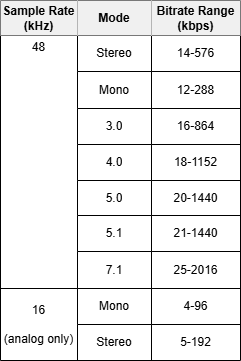 |

Examples
Starts audio encoders 0, 2 and 3. You will receive the following confirmation:
|
Stops audio encoders 0, 1, 2 and 3.
|
Sets the Audio Input to SDI1CH1+2 |
Sets the Audio Bitrate to 128. You will receive the following confirmation:
|
or
Returns audio configuration information for the encoder, such as:
|
Returns audio status information for the encoder, such as:
|
Returns audio configuration information for a Rugged encoder configured for Analog Input, such as:
|
Related Topics