
Connecting the DVI-I Interface (Makito X-DVI)

Note
The same DVI connector is used for Analog (Component/RGB) or Digital (HDMI/DVI) input.
To connect the Makito X DVI-I Interface:
Component Analog/Digital Video/Computer Graphics: Connect your Video Source cable to the encoder's DVI-I Input connector.
Analog Audio In: Connect your Audio Source cable to the encoder's 8-pin Mini-DIN connector (shown below).
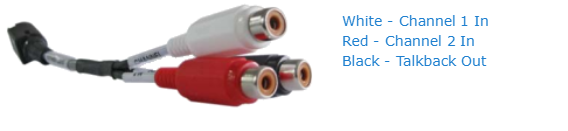
For unbalanced audio, use the 8-pin audio to 3-RCA female cable adapter (included in the package, shown below).
A balanced audio cable adapter is available from Haivision upon request. (See Audio Breakout Cables.)
DVI-I Input Connections (#S/B-292E-DVI)
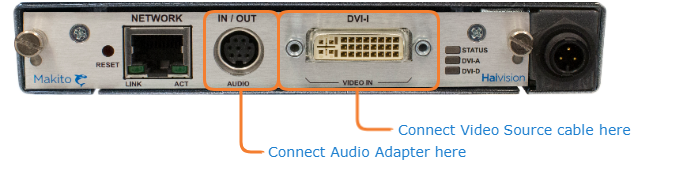
DVI-I A/V Input Connections
Audio to RCA Female Cable Adapter (Unbalanced)
Related Topics:
See Audio Connector Pinout for the balanced/unbalanced audio pinout.
To configure the encoders, see Video Encoder Settings (Web interface), or videnc (CLI).