
Configuring the Decoder HDMI Display
From the HDMI Display page, you can configure the HDMI port to mirror the same content that is seen on either SDI 1 or SDI 2. The decoder also can support the display of computer graphics content over the HDMI port.

Note
By default, HDMI displays the SDI 1 content, so you only need to change the HDMI setting to monitor the SDI 2 channel.
HDMI Output
Click HDMI on the output interface navigation bar.
On the HDMI 1 Display page, if required, select the video source.
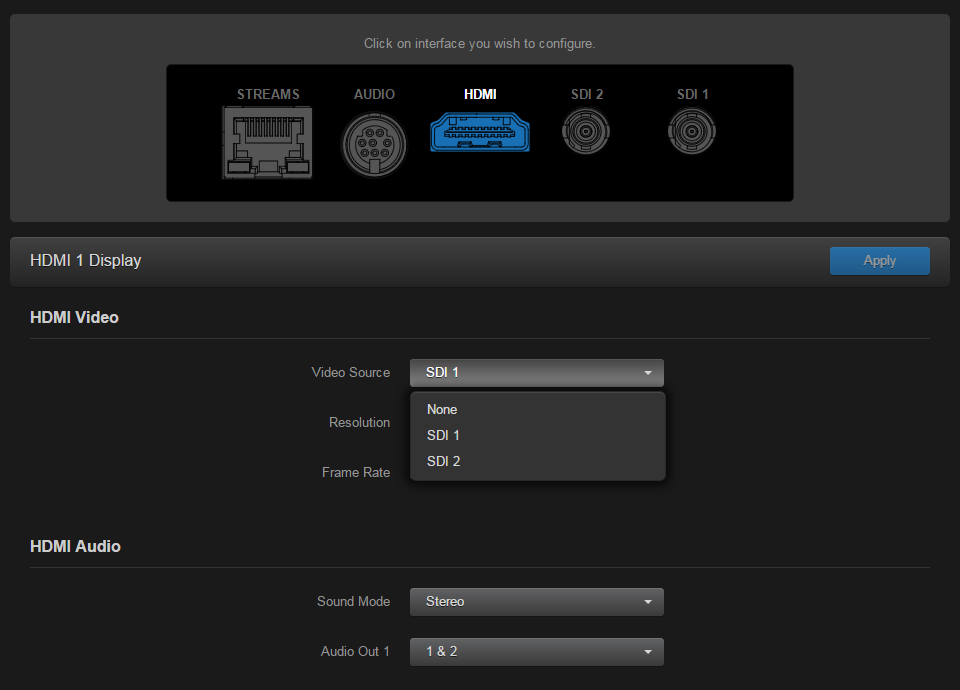
HDMI1 Display Page
To play streams containing multiple audio channel pairs as surround sound over the HDMI interface, select "Surround" for the Sound Mode.
For HDMI Audio (Stereo Sound Mode), select which audio source to play on the HDMI audio channels, either
1&2,3&4,5&6, or7&8. The default audio source is the first pair in the input stream.To apply your changes, click Apply.
Related Topics