
Why does KB Encoder/Transcoder Split Recordings
KB automatically splits a recording in progress when it experiences a disconnect. This is the expected behavior to help ensure that at least some of the recording is retrievable. While the Makito X encoder excels at transporting low-latency HD video over any network at extremely low bitrates; regular disconnections from the Makito X source can cause KB to split the recording. To avoid this, ensure that you are running with a high enough SRT latency.

Note
Latency can be set at both the encoder and decoder. The higher of the two values is used for the SRT stream.
The SRT Latency parameter is the worst case value based upon the current link. For example, if a ping returns 30 ms, multiply it by 4 and use the result as the latency. In this case, the latency would be 120 ms.
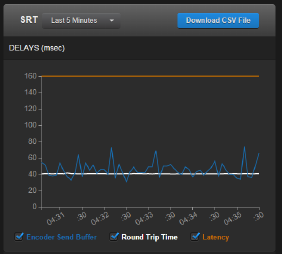
To tune the SRT Latency, look at the Statistics graphs (available from the encoder's web interface). For example, the orange lines should be above the worse case of blue variations.

Tip
When adjusting the SRT parameters ignore any variations (displayed on the Statistics charts) at the time of the change. For example, if you change Latency from 20 to 50, you will see a spike in the chart. Be sure to allow headroom for latency.
When configuring the SRT stream, the average bandwidth of the link can be increased until you reach the maximum bitrate that the link will allow without too much packet loss. Once the packet loss rate begins to increase, lower your bandwidth to establish a small (less than 5% of stream bandwidth) packet loss value for the SRT stream.
Additional information can be obtained using the Iperf bandwidth measurement tool that is embedded in the Makito X encoder software. Refer to the Makito X SRT Addendum: Deployment Scenarios and Tuning booklet available from the Support Portal for more information.