
Getting the Unit Information
To get the unit information from the Unit Panel or from the Web Interface, see the sections below.
Unit Panel
From the Home menu, turn the wheel to select
 >
>  .
.Turn the wheel to scroll and display the unit's information.
Web Interface
From the Dashboard, in the Device section, you can access to most of the unit's information. For more information, click Settings > System.
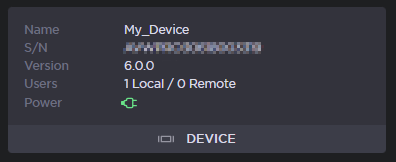
The following unit information appears:
Product Name
Hardware ID or Serial Number
Firmware Version
Users: Number of connected to the web interface
Local: Locally on the LAN (Ethernet or WiFi).
Remote: From a StreamHub (up to 4 users).
Power: Indicates how the device is powered.