
Adding a Record Profile
To add a Record Profile from the Unit Panel or from the Web Interface, see the sections below.
Unit Panel
From the Home menu, turn the wheel to select
 >
>  .
.Press the wheel again to create a new record profile.
Press the wheel to enter the Profile Name field.
Turn and press the wheel to select characters and compose a name.
Select the
 key and press the wheel to confirm the record profile name.
Use the wheel to configure the Record profile settings:
File Format (Transport Stream, MP4)
Video settings (Encoder Type, Bitrate)
Audio Settings (Encoder Type, Channel Layout, Bitrate)
Select
 and press the wheel to confirm the creation of the Record profile.
Web Interface
In the sidebar, click Streaming > Record.
Click the Add Profile button. The Add Record Profile dialog opens:
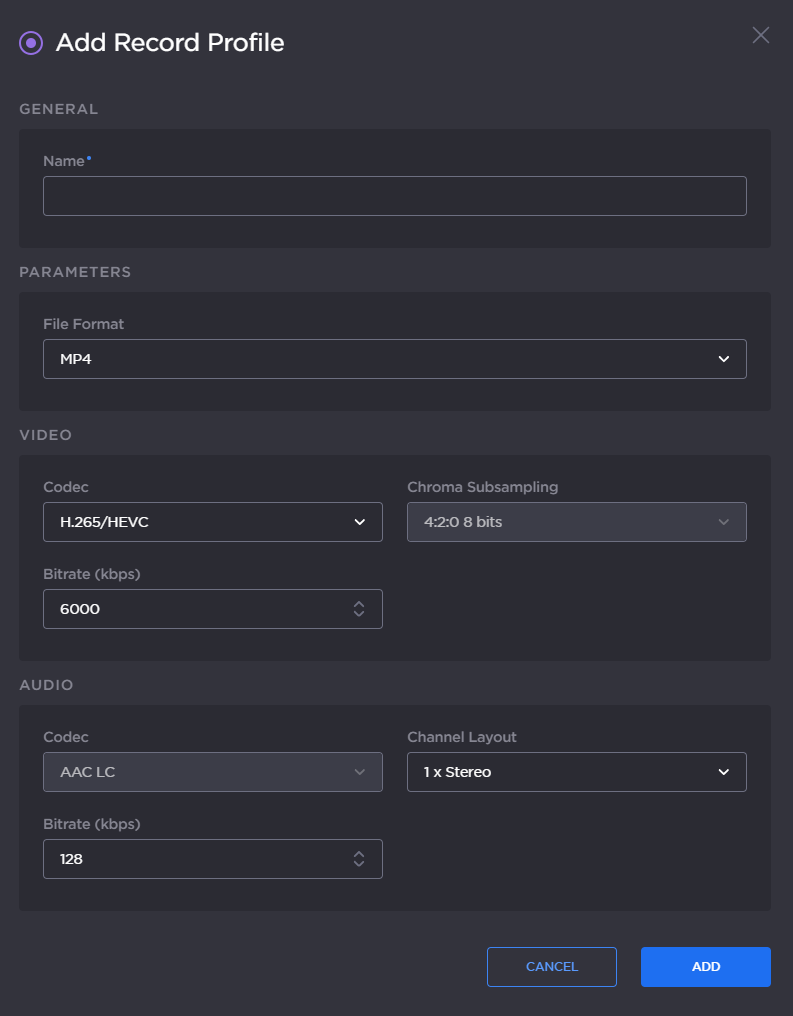
Add Record Profile
Enter a profile name in the Profile Name field.
Choose the File Format (Transport Stream or MP4).
Choose the video Encoder Type.

Note
For Air320e-5G only.
Set the video Bitrate.
Select the audio Channel Layout.
Set the total audio Bitrate.
Click the Add button.