
Troubleshooting YouTube Streams
Try the following troubleshooting tips if you are having issues with your YouTube streams:
If you are receiving a lot of stream health warnings in the YouTube dashboard, consider setting the KB to encode and send 50-60 fps. Also, watch the KB Encoder’s status lights for any issues on the sending side.
Verify your privacy setting is set according to your intended audience. For example, select Public for a public broadcast.
Your channel page does not auto-refresh. However, the video watch pages automatically update themselves as broadcasts go live and end.
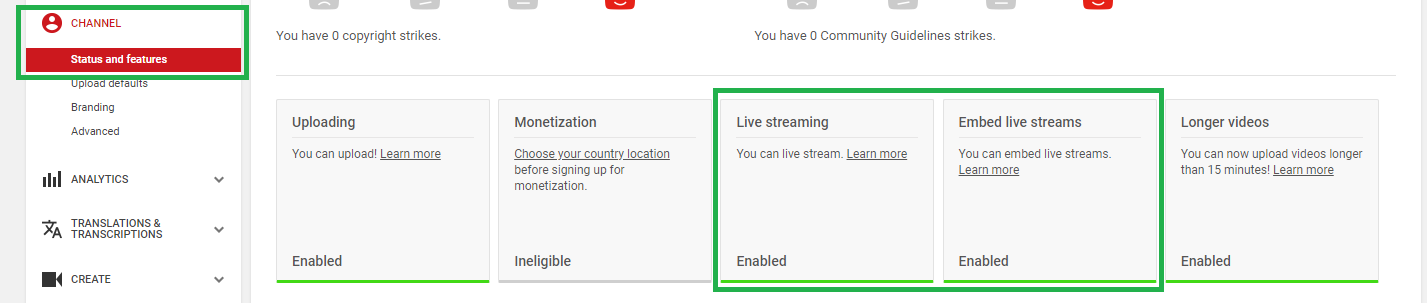
Verify Live streaming and Embed live streams are enabled under Channel > Status and features.
In the Stream Now method, YouTube only displays one Server URL. In the Events method there are two server URLs (one for the primary stream and one for the backup stream). Testing indicates that you can also utilize a backup stream in the Stream Now method. These are the current URL formats that you can use to determine the correct format of the backup stream:
Primary Server URL:
rtmp://a.rtmp.youtube.com/live2Backup Server URL:
rtmp://b.rtmp.youtube.com/live2?backup=1
If the URL format changes in the future, visit the Events method on your dashboard to determine the current format.

Caution
This is undocumented on YouTube’s site at this time. Be sure to test before using this in your production environment.
Send the same content on both primary and backup streams to ensure smooth fail-overs between streams. If using two encoders, ensure their system clocks are synced to an NTP server.