
Haivision Media Platform Integration
Haivision Helper and HMP Workflow
If multicast streaming or the low latency player is enabled on HMP for a source, when a user views it, Haivision Helper launches and fetches the multicast or low-latency agent from the nearest Media Gateway:
For HMP 3.8 and later, the multicast agent "flips" the video from its delivery format (MPEG2 TS) to HLS, and feeds the resulting stream locally to the user’s browser for playback.
For HMP 3.7 and earlier, the multicast agent "flips" the video from its delivery format (MPEG2 TS) to HLS or RTMP (as configured in HMP), and feeds the resulting stream locally to the user’s browser for playback.
The low-latency agent negotiates a direct session with the Media Gateway and manages buffered playback to the user's browser.
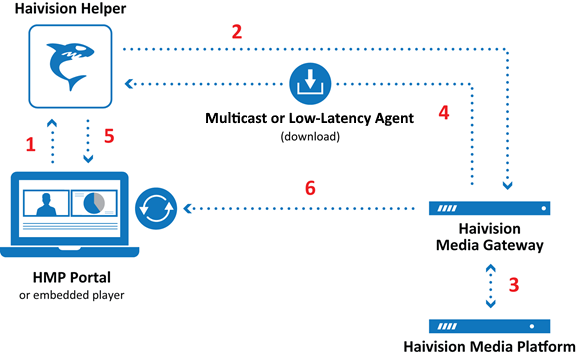
The end user clicks a link to a live video asset in their browser (in HMP Portal or embedded player). This request is directed (via javascript) to the Haivision Helper running locally in the background.
Haivision Helper sends a request for the video, along with information such as the end user’s current OS and browser, to the nearest Media Gateway.
The Media Gateway checks its cache for the appropriate version of the multicast or low-latency agent, and if necessary fetches it from the HMP server.
Media Gateway sends the multicast or low-latency agent to the end user.
Haivision Helper verifies the authenticity of the downloaded agent, and then launches it (with appropriate parameters).
Depending on if a multicast stream or the low-latency player is used:
The multicast agent joins the multicast group, then negotiates access and encryption for the video. The multicast agent converts the stream received from the Media Gateway from multicast TS to native web video (either HLS or RTMP). It then delivers the stream securely to the local browser over the local host interface on the first available port in the applicable range (1935-1995 for RTMP streams in HMP 3.7 and earlier).

Note
It is the multicast agent that does the flipping; Haivision Helper itself never handles the video data. In HMP 3.7 and earlier, RTMP is recommended for the lowest possible latency but requires the legacy Flash player. HLS can be used with either the Flash player or modern HTML5 player, but introduces latency when creating TS segments. If the video is not multicast, or if Haivision Helper is not installed, the end user receives standard unicast in the browser.
Support for the legacy Flash player has been removed from HMP 3.8 and later versions.
The low-latency agent initiates a connection to the HMG server over HTTPS. After the connection is established, the video is streamed over a persistent connection to the agent using HTTP transport over port 443. The agent containerizes the video stream and manages buffered playback to the user's browser.

Tip
For large scale events, the best practice is to preload the multicast and low-latency agents beforehand to avoid concurrent downloads. You should run implementation tests with a series of multicast/low-latency events, inviting groups of users to join/test multicast/low-latency streams. This will force the preloading of the agents on their computers, and caching of the agents on Media Gateway servers.
Configuring a Static URL for Haivision Helper
Haivision Helper communicates securely with the browser using the HTTPS protocol. To facilitate this secure communication, a valid SSL certificate is included in the application. In the SSL certificate, Haivision Helper uses a wildcard name, *.apps-local.haivision.com, that always resolves to 127.0.0.1 (the local user’s machine). For organizations that do not wish for Haivision Helper to use a wildcard name, an option is included to use a static address instead. Subsequently, your DNS servers must resolve this address to 127.0.0.1.
To force Haivision Helper to use a static address:
On HMP click the
 icon and select from the navigation drop-down menu.
Click System Settings on the toolbar and then click Security on the sidebar.
Next to Static Helper URL, click the toggle to ON. When enabled, the static URL that is used by Haivision Helper is displayed.
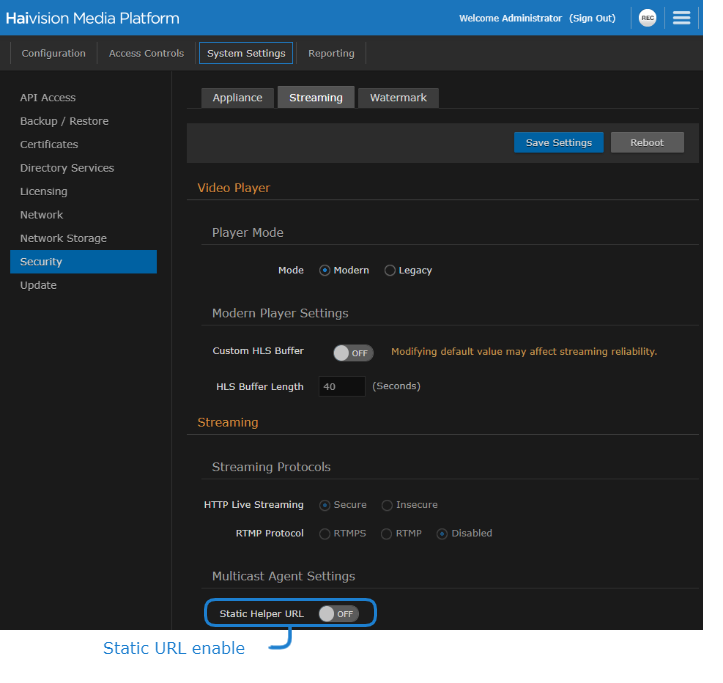
Click Save Settings.