
Device Summaries
Once a device is paired with EMS, links to the device's interface and an expandable information pane become available.
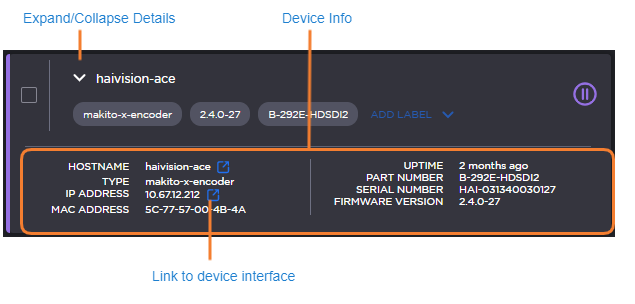
Clicking the link icon next to the device's name or IP address will take you to its web interface.
Hovering the mouse over a device reveals the Expand/Collapse button. Click Expand to reveal detailed device information.
Field | Description |
|---|---|
Hostname | The device's hostname as it appears on the network. |
Type | The device type. |
IP Address | The device's IP address with a link to its web interface. Devices with multiple IP addresses have each address listed separately. |
MAC Address | The unique hardware identifier assigned to the device. |
Uptime | How long the device has been online. |
Part number | The device model number. |
Serial number | The unique serial identifier assigned to the device. |
Firmware version | The currently installed firmware package version. |