
Connecting Appliances to the Network

Important
Before proceeding, please familiarize yourself with the following safety and disposal notices:
Appliances should be set up and connected to the network before system installation and initialization:
Mount the appliances in the server rack, if applicable.
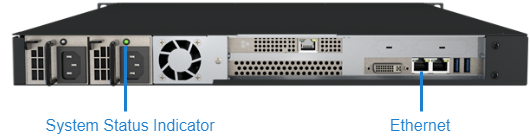
Connect to the network using an Ethernet (type Cat 5 or higher) cable.
Attach the power cord to the power receptacle.
If applicable, unscrew the plate on the front of the device to access the power button and switch the button to on. The system status indicator will light up.
The image below shows the network ports and system status LED for the Command 360 Manager:

Note
See the Quick Start Guides section for more hardware setup topics.