
Audio Controls
When an audio processor is added to an Activity, its associated sources and zones can be controlled in the Activity Interface. Note that, in the image below, there are two defined zones in the Activity. Both zones have Speakers On/Speakers Muted and volume slider controls, while one zone ("Front of Room") contains microphones, and thus has Mics On/Mics Muted controls.
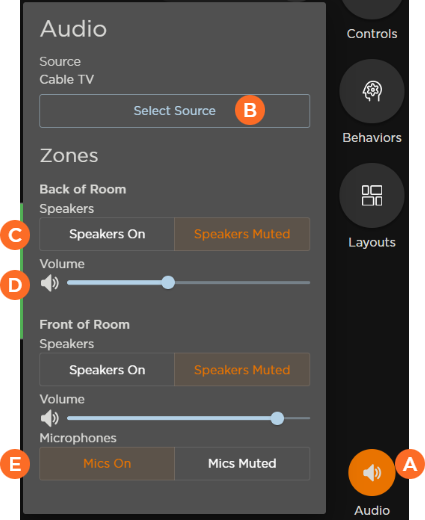
 Click the speaker icon to open the audio controls panel.
 Select audio sources.
 Mute or unmute speakers.
 Click and drag the slide control to adjust the volume.
 Mute or unmute microphones.
Related Topics