
Getting the Unit Information
To get the unit information from the Unit Panel, or from the Web Interface, see the sections below.
Unit Panel
From the Home menu, tap
 .
.Tap
 and select
  .
.When the Device Info screen appears, use
 to scroll down to view the unit information.
Web Interface
Click the  icon to display unit information:
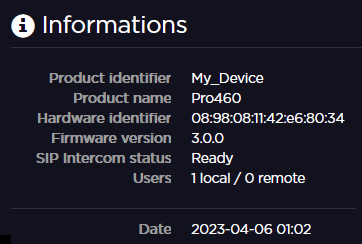
You can access the following unit information:
Product Identifier
Product Name
Hardware ID
Firmware Version
SIP Intercom Status
Ready: The product is registered to a Manager or connected to a StreamHub supporting SIP intercom.
In call: A call is in progress with Manager or a StreamHub.
Users: Number of connected to the web interface
Local: Locally on the LAN (Ethernet or WiFi).
Remote: From a StreamHub (up to 4 users).
Date: Current date and time at the location of the unit.